LeetSync
Autonomous, privacy-focused LeetCode to GitHub synchronization engine
LeetSync
Autonomous, privacy-focused LeetCode to GitHub synchronization engine
How It Connects
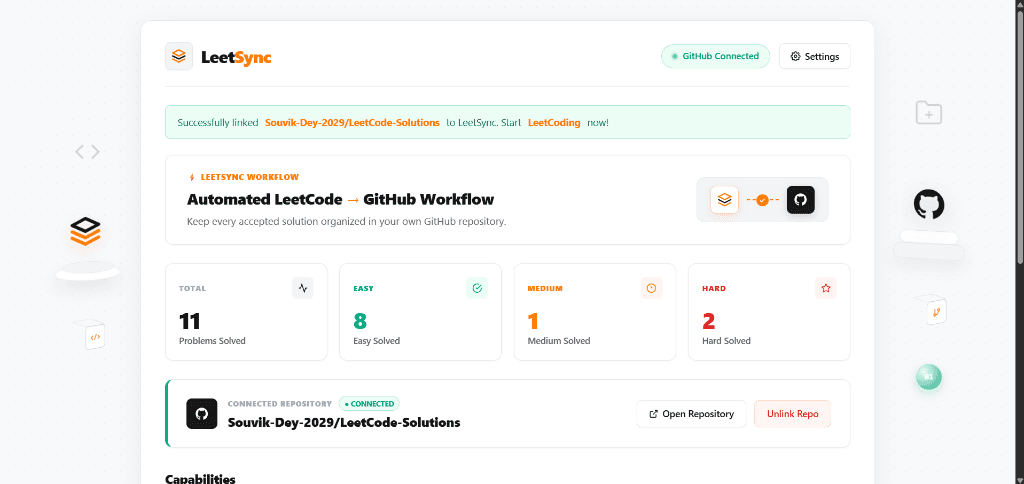
LeetSync is engineered as a Chrome Extension Manifest V3 background service worker and content script system. When a submission completes on leetcode.com, an in-page observer hooks the submission event and extracts problem slug, difficulty, accepted code, and execution metrics. The service worker authenticates with GitHub via Personal Access Token securely persisted in chrome.storage.local, executes a duplicate check against the destination repository via the GitHub REST API (Octokit/fetch), commits the solution tree in hierarchical folders (e.g., Problem-Name/Solution.ext), and surfaces real-time sync telemetry to the extension popup dashboard.
Components
System Components
How It Works
Problem Solved & Accepted
User submits problem code; LeetCode judges and renders the green "Accepted" state.
Metadata & Code Extraction
Parses problem title, numeric ID, runtime, memory percentile, language syntax, and raw solution code.
Service Worker Verification
Queries chrome.storage.local for encrypted user GitHub token and target repository configuration.
Repository Tree Duplicate Check
Sends GET request to GitHub contents endpoint to inspect if solution version already exists.
Atomic Solution Commit
Dispatches PUT request to create file under /{Difficulty}/{Problem_ID}-{Slug}/{Solution_File}.
Telemetry & UI Feedback
Emits sync status toast and increments user synced problems count in local metrics database.
Problem Solved & Accepted
User submits problem code; LeetCode judges and renders the green "Accepted" state.
Metadata & Code Extraction
Parses problem title, numeric ID, runtime, memory percentile, language syntax, and raw solution code.
Service Worker Verification
Queries chrome.storage.local for encrypted user GitHub token and target repository configuration.
Repository Tree Duplicate Check
Sends GET request to GitHub contents endpoint to inspect if solution version already exists.
Atomic Solution Commit
Dispatches PUT request to create file under /{Difficulty}/{Problem_ID}-{Slug}/{Solution_File}.
Telemetry & UI Feedback
Emits sync status toast and increments user synced problems count in local metrics database.
Technical Breakdown
Granular architectural layers, runtime dependencies, and audited production decisions.
- React with Tailwind CSS embedded inside Chrome Extension action popupcopy
- Real-time badge counter updating active sync state on browser toolbarcopy
- Accessible settings panel for selecting repo name, branch, and directory conventioncopy
- Chrome Manifest V3 background service worker with event-driven executioncopy
- Asynchronous queueing pipeline to handle bursts of concurrent submissions smoothlycopy
Engineering Tradeoffs & Key Decisions
Why this architecture over alternativesManifest V3 Service Worker over Persistent Background Pages
Implemented purely event-driven Service Worker rather than a persistent background page.
Complies with modern Chrome security standards, consumes zero RAM when idle, and wakes on demand.
Client-Side Only Authentication Flow
Tokens are stored strictly in browser chrome.storage with no telemetry backend.
Guarantees absolute developer privacy: personal GitHub tokens never transit an intermediary server.
Hierarchical Difficulty Directory Scheme
Organized repository paths by difficulty tag and problem ID rather than a flat root list.
Enables clean navigation on GitHub and automated portfolio generation scripts for engineering interviews.